Import from Handwritten Recipe Photo
Turn a handwritten recipe card into a real, saved recipe.
Snap a photo of a handwritten recipe — a family card, a notebook page — and Rasora reads it into a structured recipe.
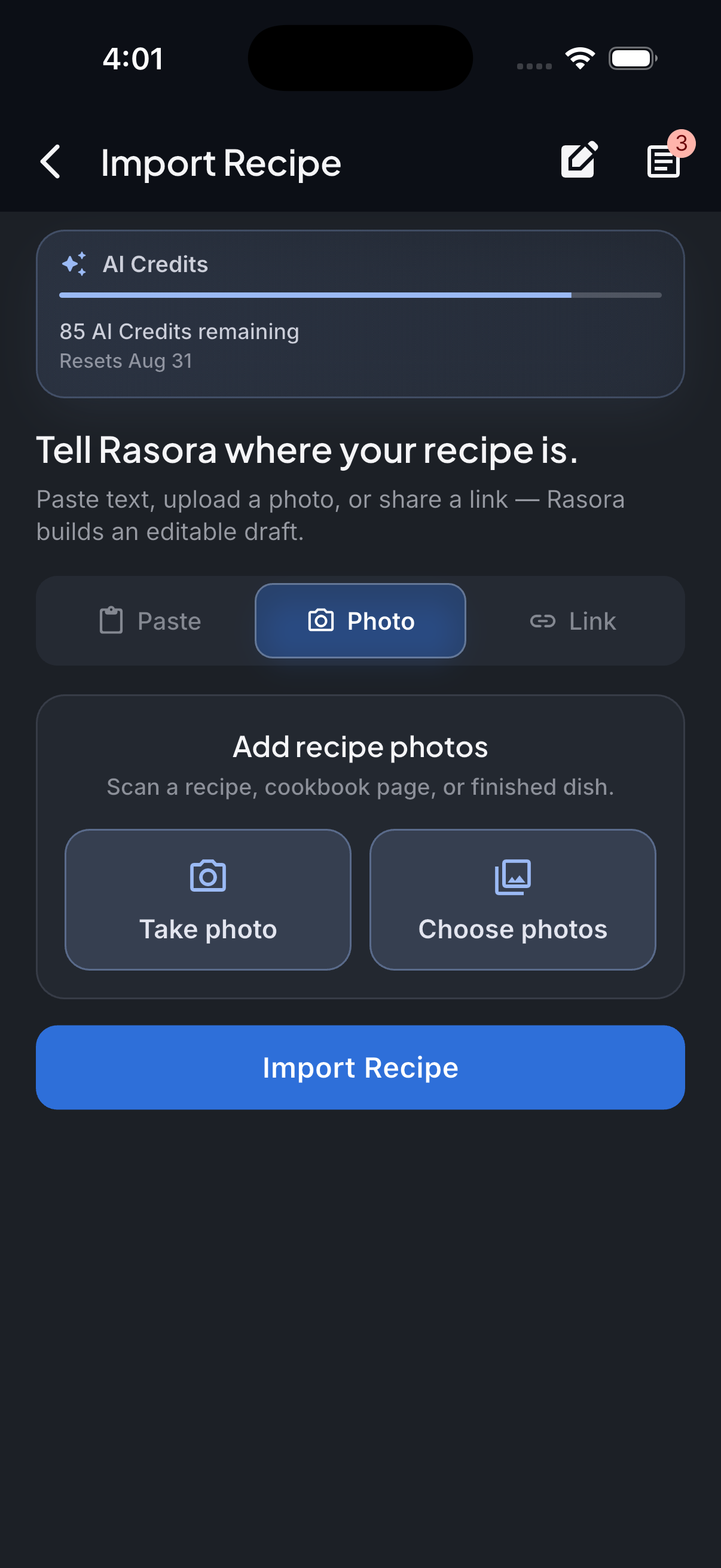
AI Import
Import with AI
Turn links, photos, and notes into structured recipes in seconds.
How it works
The photo is read for ingredients and steps the same way a person would read it — handwriting quality affects accuracy, so a clear, well-lit photo works best.
Take or choose a photo
Photograph the recipe card or notebook page in good light, or pick an existing photo.
Open AI Import in Rasora
Go to AI Import and choose the Photo tab, then select the image.
Rasora reads the handwriting
Ingredients and steps are read from the photo directly.
Review and save
Handwriting can be genuinely hard to read even for a person — check the extracted recipe carefully, fix anything unclear, and save it to your cookbook.
Try it yourself
Get Rasora and import your first Handwritten Recipe Photo recipe.
Free to start — AI import, a real cookbook, and nutrition you can trust.
Common questions
What if the handwriting is hard to read?
Accuracy depends on how legible the handwriting is, same as it would for a person reading it. Rasora won't guess at a word it can't make out — it's worth double-checking the result against the original card.
Does this work for a whole recipe box, or just one card at a time?
One recipe photo at a time — for multiple recipes, import each card separately.
Can I use a photo of a printed recipe instead of handwritten?
Yes — the same Photo import handles both printed and handwritten recipes.


